Documentation Index

Fetch the complete documentation index at: https://docs.readmin.app/llms.txt

Use this file to discover all available pages before exploring further.

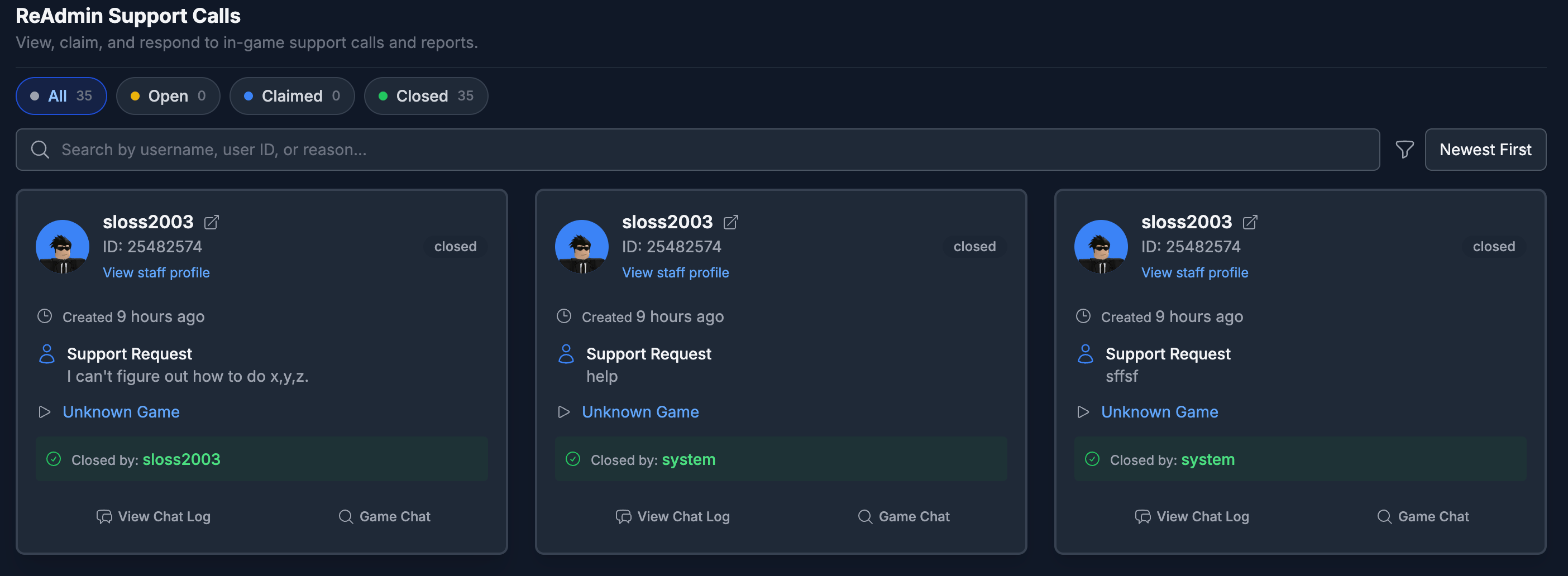
Calls page When a player needs help or wants to report a rule-breaker, Calls turns that moment into a ticket your staff can actually act on. Every request drops into a live queue on your dashboard where your team claims it, works it, chats in context, and jumps straight into the server — no Discord ticket bot, no context-switching, nothing slipping through the cracks.

Workflow

  1. Filter calls by status (open, claimed, closed).
  2. Search by username, user ID, reported user, or reason.
  3. Claim a call, work it, then release or close it.
  4. Open chat for the ticket and coordinate with your team.
  5. Use Join Game when a place ID is available to respond in person.
Claimed calls show the assigned agent, status counters update live as tickets move through the queue, and report calls carry the suspected user so follow-up is one click away.

Setting it up

Calls are powered by Remote Admin. Enable Calls for your workspace from Remote Admin settings, and make sure the Activity Tracking module is installed.