> ## Documentation Index
> Fetch the complete documentation index at: https://docs.readmin.app/llms.txt
> Use this file to discover all available pages before exploring further.
# Remote Admin
> A permission-gated in-game command layer, moderation calls, and AFK detection — all controlled from your dashboard.
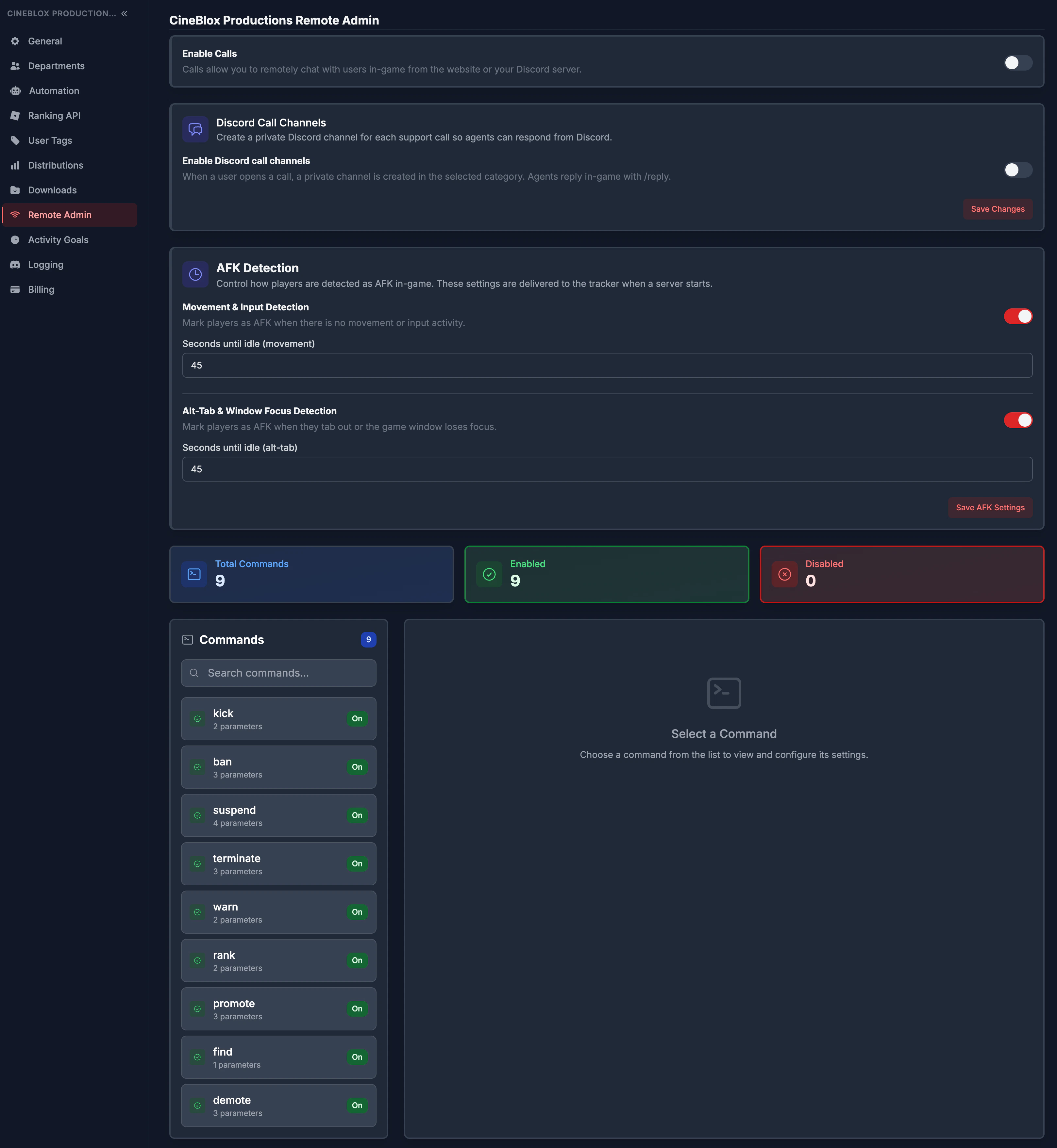 Run your games from the same place you run your team. Remote Admin gives your
staff in-game commands — bans, kicks, warnings, rank changes — that are gated by
the exact roles, departments, and permissions you already manage in ReAdmin.
There's no third-party admin system to trust and no leaked commands: grant a
command to a role, a department, or a single person, and revoke it just as fast.
Every action flows straight back into ReAdmin as a real record your whole team
can see.
## Built-in commands
ReAdmin includes ready-to-use commands out of the box, including `ban`, `kick`,
`warn`, `promote`, `demote`, `rank`, `suspend`, `terminate`, and `find`. Each can
be enabled or disabled and assigned to the exact people who should have it. Need
something specific to your group? Build your own and connect it straight to the
tracker — see [Custom Remote Admin Commands](/api-reference/custom-commands).
## Command permissions
* Review a command overview at a glance (total, enabled, and disabled).
* Search commands and open a detail panel for any of them.
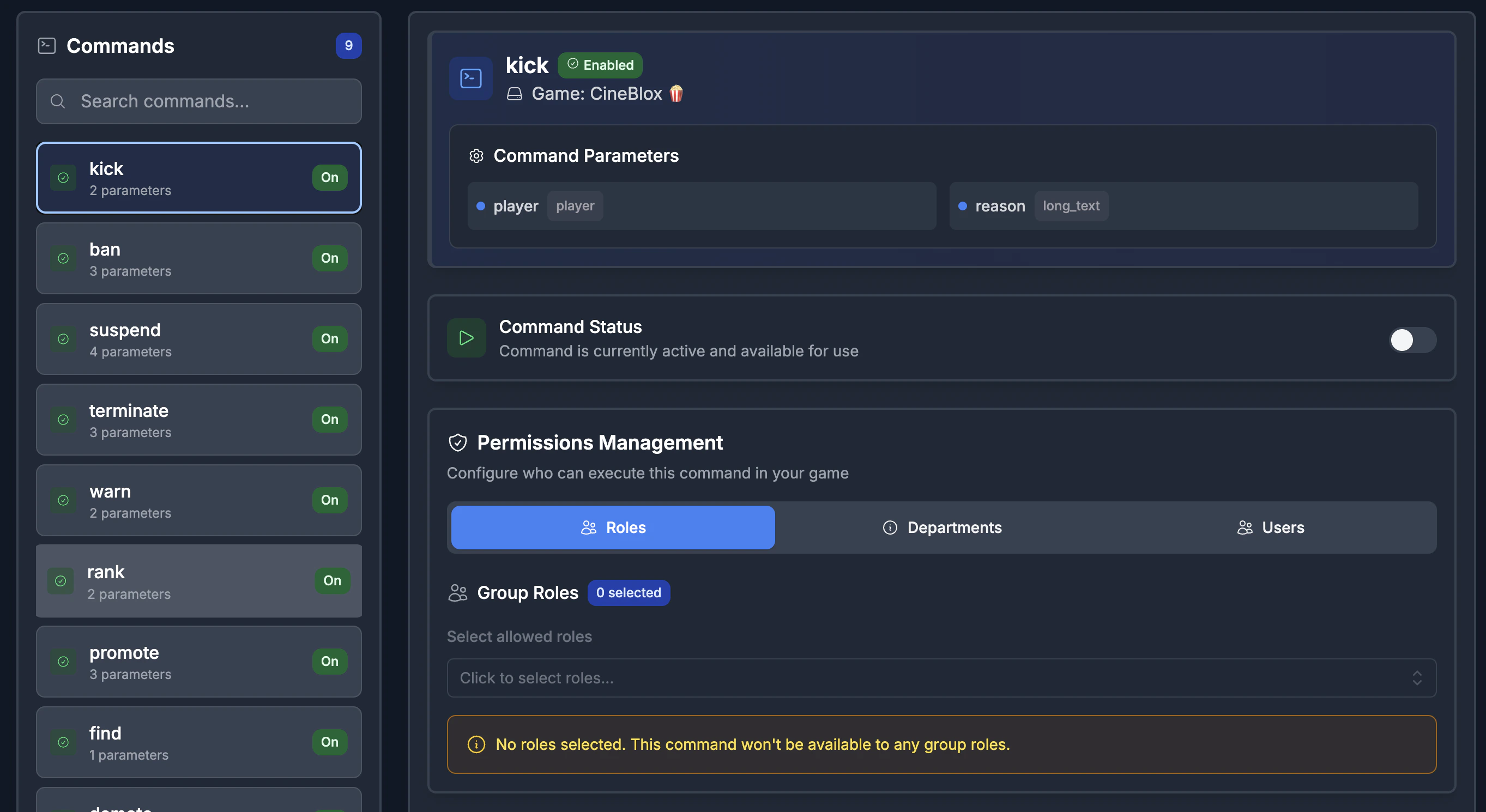
* Assign permissions by **role**, **department**, or **individual user**.
* Changes propagate to live game servers — no republish required.
Run your games from the same place you run your team. Remote Admin gives your
staff in-game commands — bans, kicks, warnings, rank changes — that are gated by
the exact roles, departments, and permissions you already manage in ReAdmin.
There's no third-party admin system to trust and no leaked commands: grant a
command to a role, a department, or a single person, and revoke it just as fast.
Every action flows straight back into ReAdmin as a real record your whole team
can see.
## Built-in commands
ReAdmin includes ready-to-use commands out of the box, including `ban`, `kick`,
`warn`, `promote`, `demote`, `rank`, `suspend`, `terminate`, and `find`. Each can
be enabled or disabled and assigned to the exact people who should have it. Need
something specific to your group? Build your own and connect it straight to the
tracker — see [Custom Remote Admin Commands](/api-reference/custom-commands).
## Command permissions
* Review a command overview at a glance (total, enabled, and disabled).
* Search commands and open a detail panel for any of them.
* Assign permissions by **role**, **department**, or **individual user**.
* Changes propagate to live game servers — no republish required.
 ## Calls (moderation dashboard)
Enable or disable [Calls](/features/calls) for your workspace. When enabled,
players can open in-game support and report tickets that land in a live queue
your staff work directly from the dashboard.
## AFK detection settings
Tracked time should be real time. Remote Admin lets activity admins tune exactly
how idle time is detected so your activity data stays honest:
* Toggle **movement / input-based** idle detection.
* Toggle **alt-tab / window-focus** idle detection.
* Set independent idle thresholds (in seconds) for each detection type.
* Save to push the updated behavior to every game server automatically.
## Related pages
* [Custom Remote Admin Commands](/api-reference/custom-commands)
* [Calls](/features/calls)
* [Games](/features/games)
* [Game Bans](/features/game-bans)
## Calls (moderation dashboard)
Enable or disable [Calls](/features/calls) for your workspace. When enabled,
players can open in-game support and report tickets that land in a live queue
your staff work directly from the dashboard.
## AFK detection settings
Tracked time should be real time. Remote Admin lets activity admins tune exactly
how idle time is detected so your activity data stays honest:
* Toggle **movement / input-based** idle detection.
* Toggle **alt-tab / window-focus** idle detection.
* Set independent idle thresholds (in seconds) for each detection type.
* Save to push the updated behavior to every game server automatically.
## Related pages
* [Custom Remote Admin Commands](/api-reference/custom-commands)
* [Calls](/features/calls)
* [Games](/features/games)
* [Game Bans](/features/game-bans)