> ## Documentation Index
> Fetch the complete documentation index at: https://docs.readmin.app/llms.txt
> Use this file to discover all available pages before exploring further.
# Flows
> Automate your workspace — when something happens, run actions on a member.
This feature is early-access, please give us feedback!
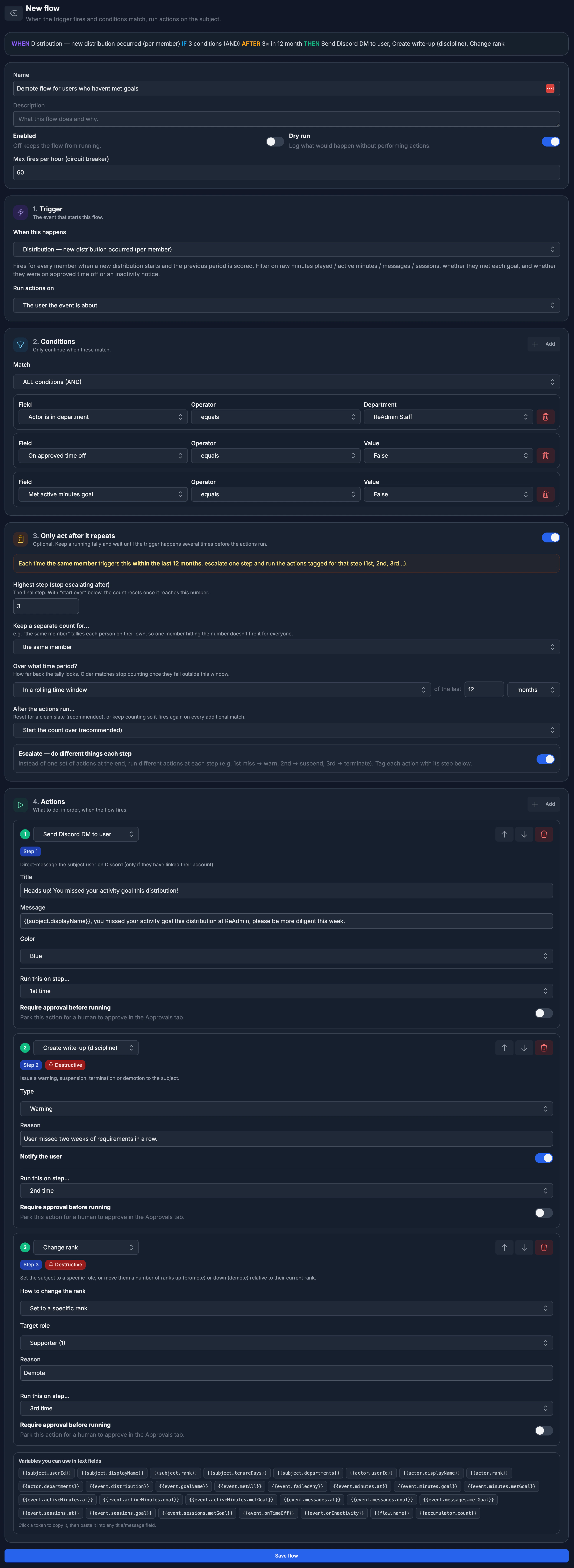 Flows is ReAdmin's automation builder. You describe a simple recipe —
**when** something happens, **if** it matches your conditions, optionally
**after** it repeats a few times, **then** run a set of actions on the member —
and ReAdmin runs it for you, around the clock. It's the difference between
manually chasing inactive staff every week and having write-ups, Discord pings,
and rank changes handled automatically.
## How a flow works
Every flow is built from four parts, in order:
1. **Trigger** — the event that starts the flow (a write-up is logged, a member
joins, a new distribution occurs, or simply a schedule).
2. **Conditions** — optional filters that must match before the flow continues
(e.g. only when the subject is in a certain department, below a rank, or the
reason contains a word).
3. **Only act after it repeats** — an optional running tally that waits until the
trigger has matched several times before the actions run (e.g. "after 4
write-ups, terminate").
4. **Actions** — what to do, in order, when the flow fires.
You can read your flow back as a plain sentence at the top of the builder:
**WHEN** … **IF** … **AFTER** … **THEN** ….
## Creating a flow
1. Open **Flows** in your workspace and click **New flow**.
2. Give it a name and an optional description.
3. Pick a **Trigger** and choose who the actions run on (the user the event is
about, the user who caused it, the related team, or the related game).
4. Add any **Conditions** you need.
5. (Optional) Turn on **Only act after it repeats** to wait for a pattern.
6. Add one or more **Actions**.
7. Use **Test (dry run)** to simulate the flow against a sample member, then
click **Save flow**.
Leave **Dry run** on while you tune a new flow. ReAdmin logs exactly what *would*
have happened without performing any actions, so you can confirm it behaves the
way you expect before going live.
## Triggers
| Trigger | Fires when |
| --------------------------------------------------------- | ---------------------------------------------------------------------------------------------------------------------------------------------------------------------------------- |
| **Write-up created** | Any disciplinary action — warning, suspension, termination, demotion, or promotion — is logged. |
| **Promotion request created** | A member submits or is submitted for a promotion. |
| **Promotion request — vote cast** | Someone casts a vote on a promotion request. Carries the running support/oppose tally so you can act once a request reaches enough sign-offs (e.g. promote after 5 support votes). |
| **Promotion request accepted** | A promotion request is approved. |
| **Promotion request declined** | A promotion request is declined. |
| **Member joined** | A user joins the group. |
| **Member left** | A user leaves the group. |
| **Member promoted** | A member is moved up to a higher rank (great for an automatic "you've been promoted" message). |
| **Member demoted** | A member is moved down to a lower rank. |
| **Distribution — new distribution occurred (per member)** | A distribution closes, evaluated individually for each member (great for activity goals). |
| **Goal met** | A distribution closes and a member met **every** requirement of one of their activity goals. Filter on **Which goal** to scope it to a specific goal. |
| **Distribution — new period started** | A new distribution period begins (good for announcements). |
| **On a schedule** | A time you choose (cron-style schedule). |
The **Goal met** and **Distribution** triggers both expose a **Which goal**
filter. Add a condition on it to run a flow for only one specific goal — for
example, congratulate members who hit the *Moderator* goal but not the others.
## Conditions
Conditions keep a flow from running on every event. Each condition compares a
field from the trigger — like the subject's rank, days in the group, department,
or a write-up's reason — using an operator such as *equals*, *is one of*,
*greater than*, *contains*, or *matches regex*. Match **ALL** conditions (AND) or
**ANY** condition (OR).
Smart inputs are rendered automatically: true/false dropdowns for yes/no fields,
a role picker for ranks, a channel picker for Discord channels, a department
picker, and a **goal picker** for the *Which goal* filter on activity triggers.
## Only act after it repeats
Sometimes a single event shouldn't trigger anything — it's the *pattern* that
matters. Turn this on to keep a running tally and only act once the trigger has
matched enough times.
* **How many times before acting?** — the threshold the count must reach.
* **Keep a separate count for…** — tally each member on their own, the actor, a
game, a team, or everyone in the group combined.
* **Over what time period?** — a rolling window (e.g. the last 30 days), each
calendar period, since the count last reset, or — for distribution triggers —
over the last N distributions.
* **After the actions run…** — start the count over (recommended) or keep
counting so it fires again on every additional match.
### Escalation
Flip on **Escalate** to do *different* things at each step instead of one set of
actions at the end. Tag each action with the step it belongs to — for example,
**1st miss → warn**, **2nd → suspend**, **3rd → terminate** — and ReAdmin runs
the right action as a member climbs the ladder. You're not limited to three
steps: choose **Only on a specific step…** on any action and enter any step
number (up to 100), so you can build as many escalation stages as you need.
## Actions
A flow can run any number of actions, in order. Available actions include:
| Action | What it does |
| --------------------------------------- | ------------------------------------------------------------------------------------------------------------------------------------------------------------------------------------------------------------------- |
| **Send Discord message** | Post a templated embed to a Discord webhook URL. |
| **Send Discord DM to user** | Direct-message the subject on Discord. |
| **Send Discord channel message** | Post a templated embed to a channel in your linked Discord server. |
| **Add user note** | Attach a note to the subject. |
| **Add tag** / **Remove tag** | Apply or remove a user tag. |
| **Create task** | Open a task for your team to action. |
| **Post to feed** | Publish a post to your workspace feed. |
| **Create write-up (discipline)** | Log a warning, suspension, termination, demotion, or promotion. |
| **Change rank** | Set an absolute rank, or move the member up/down relative to their current rank. |
| **Approve / decline promotion request** | Resolve the subject's open promotion request. Approving can also rank them to the requested role. Pairs with the **Promotion request — vote cast** trigger to auto-approve once a request has enough support votes. |
| **Queue in-game action** | Notify or kick the subject in whichever of your games they're currently in. |
### Template variables
Any text field — titles, messages, notes — supports `{{tokens}}` that fill in
live data from the trigger, such as `{{subject.displayName}}`,
`{{subject.rank}}`, `{{flow.name}}`, and `{{accumulator.count}}`. The builder
lists every token available for your selected trigger; click one to copy it, then
paste it into a field.
## Approvals
Any action can be marked **Require approval before running**. Instead of firing
immediately, the flow parks those actions in the **Approvals** tab for a human to
review. Approve to run them right away, or deny to discard them — perfect for
high-stakes actions like terminations.
## Safety: dry run & circuit breaker
ReAdmin is built to keep automations from causing damage:
* **Dry run** logs what a flow *would* do without performing any actions.
* **Destructive actions** (like creating write-ups or changing ranks) are gated
behind the workspace owner's permission ceiling — a flow can never do something
the owner couldn't.
* **Max fires per hour** is a circuit breaker. If a flow exceeds the limit you
set, ReAdmin automatically pauses it and tells you why, so a misconfigured flow
can't spam your members or Discord.
Flows is ReAdmin's automation builder. You describe a simple recipe —
**when** something happens, **if** it matches your conditions, optionally
**after** it repeats a few times, **then** run a set of actions on the member —
and ReAdmin runs it for you, around the clock. It's the difference between
manually chasing inactive staff every week and having write-ups, Discord pings,
and rank changes handled automatically.
## How a flow works
Every flow is built from four parts, in order:
1. **Trigger** — the event that starts the flow (a write-up is logged, a member
joins, a new distribution occurs, or simply a schedule).
2. **Conditions** — optional filters that must match before the flow continues
(e.g. only when the subject is in a certain department, below a rank, or the
reason contains a word).
3. **Only act after it repeats** — an optional running tally that waits until the
trigger has matched several times before the actions run (e.g. "after 4
write-ups, terminate").
4. **Actions** — what to do, in order, when the flow fires.
You can read your flow back as a plain sentence at the top of the builder:
**WHEN** … **IF** … **AFTER** … **THEN** ….
## Creating a flow
1. Open **Flows** in your workspace and click **New flow**.
2. Give it a name and an optional description.
3. Pick a **Trigger** and choose who the actions run on (the user the event is
about, the user who caused it, the related team, or the related game).
4. Add any **Conditions** you need.
5. (Optional) Turn on **Only act after it repeats** to wait for a pattern.
6. Add one or more **Actions**.
7. Use **Test (dry run)** to simulate the flow against a sample member, then
click **Save flow**.
Leave **Dry run** on while you tune a new flow. ReAdmin logs exactly what *would*
have happened without performing any actions, so you can confirm it behaves the
way you expect before going live.
## Triggers
| Trigger | Fires when |
| --------------------------------------------------------- | ---------------------------------------------------------------------------------------------------------------------------------------------------------------------------------- |
| **Write-up created** | Any disciplinary action — warning, suspension, termination, demotion, or promotion — is logged. |
| **Promotion request created** | A member submits or is submitted for a promotion. |
| **Promotion request — vote cast** | Someone casts a vote on a promotion request. Carries the running support/oppose tally so you can act once a request reaches enough sign-offs (e.g. promote after 5 support votes). |
| **Promotion request accepted** | A promotion request is approved. |
| **Promotion request declined** | A promotion request is declined. |
| **Member joined** | A user joins the group. |
| **Member left** | A user leaves the group. |
| **Member promoted** | A member is moved up to a higher rank (great for an automatic "you've been promoted" message). |
| **Member demoted** | A member is moved down to a lower rank. |
| **Distribution — new distribution occurred (per member)** | A distribution closes, evaluated individually for each member (great for activity goals). |
| **Goal met** | A distribution closes and a member met **every** requirement of one of their activity goals. Filter on **Which goal** to scope it to a specific goal. |
| **Distribution — new period started** | A new distribution period begins (good for announcements). |
| **On a schedule** | A time you choose (cron-style schedule). |
The **Goal met** and **Distribution** triggers both expose a **Which goal**
filter. Add a condition on it to run a flow for only one specific goal — for
example, congratulate members who hit the *Moderator* goal but not the others.
## Conditions
Conditions keep a flow from running on every event. Each condition compares a
field from the trigger — like the subject's rank, days in the group, department,
or a write-up's reason — using an operator such as *equals*, *is one of*,
*greater than*, *contains*, or *matches regex*. Match **ALL** conditions (AND) or
**ANY** condition (OR).
Smart inputs are rendered automatically: true/false dropdowns for yes/no fields,
a role picker for ranks, a channel picker for Discord channels, a department
picker, and a **goal picker** for the *Which goal* filter on activity triggers.
## Only act after it repeats
Sometimes a single event shouldn't trigger anything — it's the *pattern* that
matters. Turn this on to keep a running tally and only act once the trigger has
matched enough times.
* **How many times before acting?** — the threshold the count must reach.
* **Keep a separate count for…** — tally each member on their own, the actor, a
game, a team, or everyone in the group combined.
* **Over what time period?** — a rolling window (e.g. the last 30 days), each
calendar period, since the count last reset, or — for distribution triggers —
over the last N distributions.
* **After the actions run…** — start the count over (recommended) or keep
counting so it fires again on every additional match.
### Escalation
Flip on **Escalate** to do *different* things at each step instead of one set of
actions at the end. Tag each action with the step it belongs to — for example,
**1st miss → warn**, **2nd → suspend**, **3rd → terminate** — and ReAdmin runs
the right action as a member climbs the ladder. You're not limited to three
steps: choose **Only on a specific step…** on any action and enter any step
number (up to 100), so you can build as many escalation stages as you need.
## Actions
A flow can run any number of actions, in order. Available actions include:
| Action | What it does |
| --------------------------------------- | ------------------------------------------------------------------------------------------------------------------------------------------------------------------------------------------------------------------- |
| **Send Discord message** | Post a templated embed to a Discord webhook URL. |
| **Send Discord DM to user** | Direct-message the subject on Discord. |
| **Send Discord channel message** | Post a templated embed to a channel in your linked Discord server. |
| **Add user note** | Attach a note to the subject. |
| **Add tag** / **Remove tag** | Apply or remove a user tag. |
| **Create task** | Open a task for your team to action. |
| **Post to feed** | Publish a post to your workspace feed. |
| **Create write-up (discipline)** | Log a warning, suspension, termination, demotion, or promotion. |
| **Change rank** | Set an absolute rank, or move the member up/down relative to their current rank. |
| **Approve / decline promotion request** | Resolve the subject's open promotion request. Approving can also rank them to the requested role. Pairs with the **Promotion request — vote cast** trigger to auto-approve once a request has enough support votes. |
| **Queue in-game action** | Notify or kick the subject in whichever of your games they're currently in. |
### Template variables
Any text field — titles, messages, notes — supports `{{tokens}}` that fill in
live data from the trigger, such as `{{subject.displayName}}`,
`{{subject.rank}}`, `{{flow.name}}`, and `{{accumulator.count}}`. The builder
lists every token available for your selected trigger; click one to copy it, then
paste it into a field.
## Approvals
Any action can be marked **Require approval before running**. Instead of firing
immediately, the flow parks those actions in the **Approvals** tab for a human to
review. Approve to run them right away, or deny to discard them — perfect for
high-stakes actions like terminations.
## Safety: dry run & circuit breaker
ReAdmin is built to keep automations from causing damage:
* **Dry run** logs what a flow *would* do without performing any actions.
* **Destructive actions** (like creating write-ups or changing ranks) are gated
behind the workspace owner's permission ceiling — a flow can never do something
the owner couldn't.
* **Max fires per hour** is a circuit breaker. If a flow exceeds the limit you
set, ReAdmin automatically pauses it and tells you why, so a misconfigured flow
can't spam your members or Discord.
 ## Testing a flow
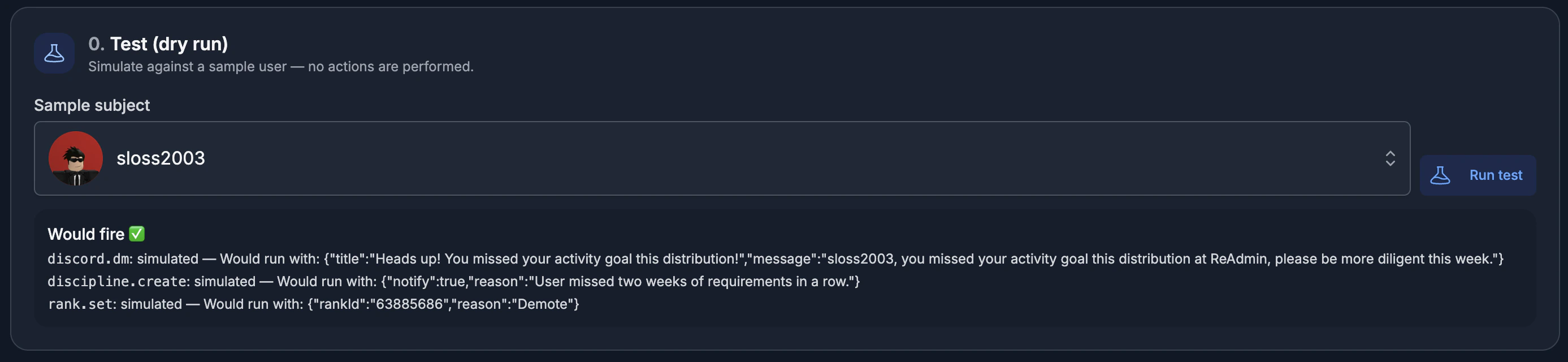
On any saved flow, use **Test (dry run)** to simulate it against a sample member.
Search for a user, run the test, and ReAdmin shows whether the flow would fire,
why, and the result of each action — all without touching anything.
## Related pages
* [Forms](/features/forms)
* [Tasks](/features/tasks)
* [Distributions](/settings/distributions)
## Testing a flow
On any saved flow, use **Test (dry run)** to simulate it against a sample member.
Search for a user, run the test, and ReAdmin shows whether the flow would fire,
why, and the result of each action — all without touching anything.
## Related pages
* [Forms](/features/forms)
* [Tasks](/features/tasks)
* [Distributions](/settings/distributions)